
Microsoft Power Platform often gets talked about as if it is one product. It is not. It is a handful of tools that solve quite different problems, and that is usually where the confusion starts.
Add AI and agents into the mix over the past year or so, and it is fair to wonder where to even begin. So here are the questions we hear most from Australian businesses, with short, straight answers.
The questions businesses actually ask
Q1: Is Power Platform one product or several?
Several, working together. Microsoft describes five product areas: Power BI for reports and dashboards, Power Apps for business apps, Power Automate for automating repetitive work, Power Pages for websites and portals, and Copilot Studio for building AI agents. They can share the same data and security setup, so they feel like one family rather than five strangers.
Q2: Where should we start? Which tool solves which problem?
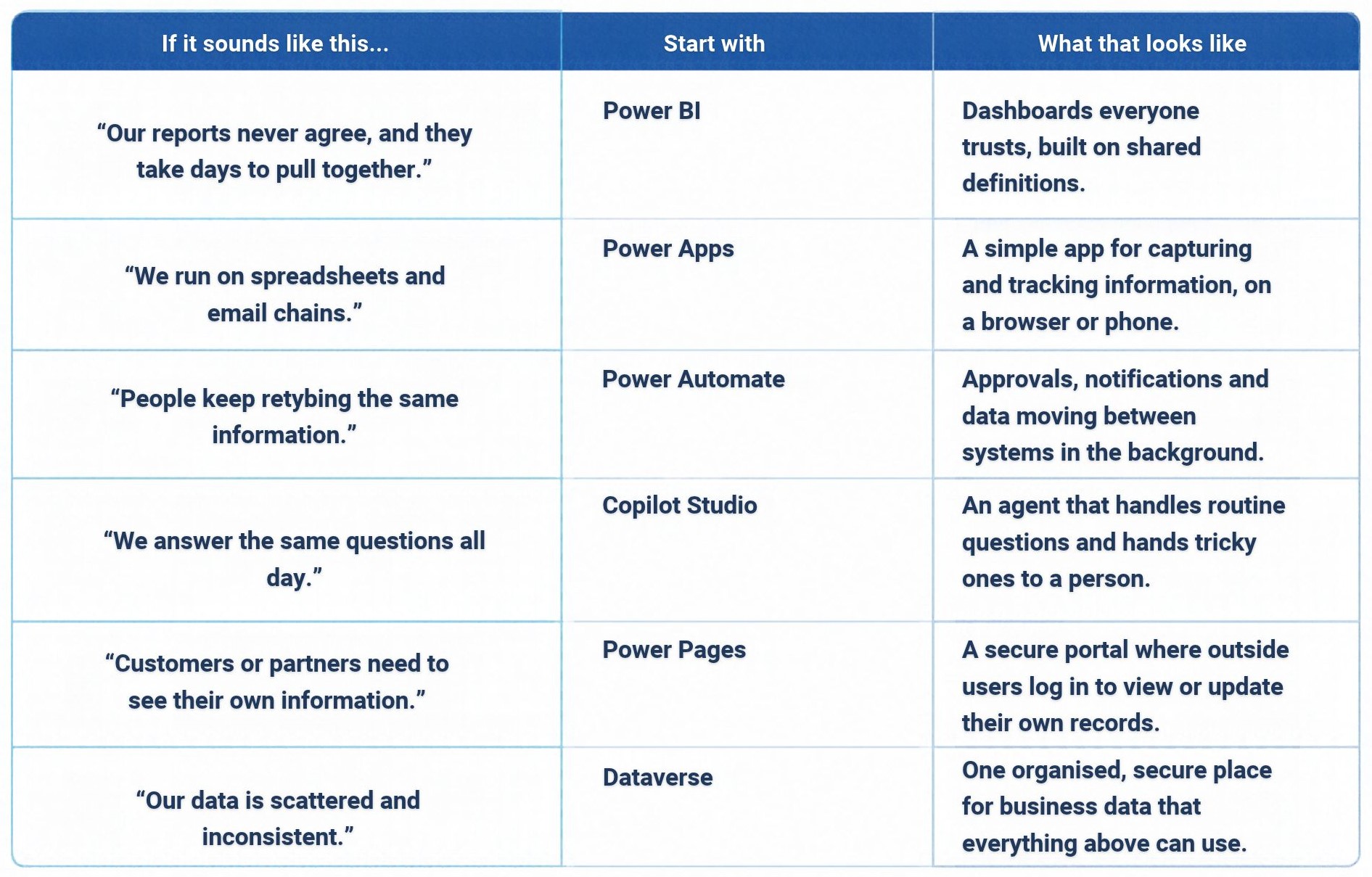
Start with the problem, not the tool. If your numbers never agree, look at Power BI. If work lives in spreadsheets and email chains, look at Power Apps. If people keep retyping the same information, that is a job for Power Automate. The table further down matches common problems to a sensible starting point.
Q3: What is Dataverse, and do we actually need it?
Think of it as a secure, organised home for your business data – stored in tables, with rules and permissions built in. Apps, automations and agents can all draw from the same place, so everyone works from the same information. You do not always need it on day one, because simple projects can run on data you already have in places like SharePoint or Excel. But once you want tighter security, consistency or room to grow, it earns its keep.
Q4: Where do Copilot and AI fit in?
In two places. First, inside the apps your team already uses. Microsoft 365 Copilot is now available in model-driven Power Apps, so people can ask for things like open high-priority tickets this week in plain English (and it respects the same permissions the app already has). Second, Copilot Studio lets you build AI agents that handle questions and routine tasks (it is also where Power Virtual Agents now lives). You decide which actions need a person’s sign-off before anything happens. The simple takeaway: AI sits on top of your data and processes, so getting those right comes first.
Q5: Can our own team build things, or do we always need a developer?
Often your own people can build the simple stuff (approval forms, data capture, basic automations), especially with AI helping them describe what they want. A developer or partner earns their keep on complex integrations, custom logic and anything customer facing. Power Platform will not replace every piece of custom development, but it can mean you call on it far less. Think of it as filling the gaps around your core systems, not replacing them.
Q6: Will it work with the systems we already have?
Very likely. Power Platform comes with a large library of ready-made connectors for Microsoft services and other common business systems, and you can build a custom connector for something more unusual. That includes on-premises data and older systems. Just note that some connectors count as “premium”, which brings us neatly to licensing.
Q7: What does it actually cost?
It depends on what you build, but here is the part that trips people up. Your Microsoft 365 licences already include Power Apps and Power Automate for apps and flows that use standard connectors. The moment you need a premium or custom connector, on-premises data, or Dataverse for your own app, you will usually need a standalone licence. Microsoft offers per-user, per-app and pay-as-you-go options, so there is typically a fit for a small start. A practical tip: work out which connectors your first project needs before you commit to anything. Microsoft’s pricing page has the current figures.
Q8: How do we keep it secure and under control?
Governance sounds heavy, but the basics are simple.
Separate environments keep experiments away from the systems people rely on. Data policies decide which connectors can share data with each other, so business information does not end up somewhere it should not. Managed Environments give admins extra controls, like limiting how widely an app can be shared and weekly usage insights. Access is role-based, so people see what they need and nothing more.
And for Australian businesses: when you create an environment, you choose where it lives. Microsoft keeps your data in that chosen location, other than where it is needed for support or legal reasons. If data residency matters to you, pick an Australian region from the start.
Q9: Who should own it?
Shared ownership works best. IT looks after security and environments, the business brings the use cases, and your data people look after quality and reporting standards. A small group that guides rather than gatekeeps keeps things moving without letting things get messy.
Q10: Where do businesses usually get stuck?
Rarely on the technology. It is usually a handful of familiar things: lots of small apps built with no owner, so nobody maintains them; licensing surprises once a project grows; no clear sponsor on the business side; and AI pilots that never move past the experiment stage because nobody set goals and boundaries up front. A little structure early – an owner for every app, a simple review before anything goes company wide -prevents most of it.
Which tool for which problem
Start small, build from there
Power Platform does not have to be a big, scary programme. At DataIQ, we help Australian businesses work out where to start, what to build and how to make it stick – no jargon, no bloated project plan. Just a practical conversation about what your team needs.
If any of these questions sound familiar, have a look at our Power Platform, Power Apps, Power BI, and AI services – or let’s have a conversation.
Sources:
- Introduction to Microsoft Power Platform for developers – Microsoft Learn
- What is Microsoft Dataverse? – Microsoft Learn
- Copilot Studio overview – Microsoft Learn
- Making business apps smarter with AI, Copilot, and agents in Power Apps – Microsoft Power Platform Blog
- Licensing overview for Microsoft Power Platform – Microsoft Learn
- Managed Environments overview – Microsoft Learn
- Create and apply data policies – Microsoft Learn
- Environment data location – Microsoft Learn